¶ GROWIのインストール
¶ yarnのインストール
以下のコマンドでyarnを入れるとうまく動作しない
user@Jetson $ sudo apt-get install yarn
実行するとこうなる。
00h00m00s 0/0: : ERROR: There are no scenarios; must have at least one.
¶ yarnをちゃんと入れる
一度アンインストール
user@Jetson $ sudo apt remove yarn
入れ直す。
user@Jetson $ curl -sS https://dl.yarnpkg.com/debian/pubkey.gpg | sudo apt-key add -
user@Jetson $ echo "deb https://dl.yarnpkg.com/debian/ stable main" | sudo tee /etc/apt/sources.list.d/yarn.list
user@Jetson $ sudo apt update && sudo apt install yarn
これで大丈夫。
¶ GROWIのインストール
公式手順通りに。
user@Jetson $ cd /opt
user@Jetson $ sudo git clone https://github.com/weseek/growi
user@Jetson $ cd growi
user@Jetson $ sudo git tag -l
user@Jetson $ sudo git checkout -b v3.5.9 refs/tags/v3.5.9
user@Jetson $ sudo yarn
するとエラーが。以下ログ
yarn install v1.19.1
[1/5] Validating package.json...
error growi@3.5.17-RC: The engine "node" is incompatible with this module. Expected version ">=8.11.1 <11". Got "8.10.0"
error Found incompatible module.
info Visit https://yarnpkg.com/en/docs/cli/install for documentation about this command.
user@Jetson $
nodeのバージョンが古いらしい。
user@Jetson $ sudo apt install -y nodejs npm
user@Jetson $ sudo npm install n -g
user@Jetson $ sudo n stable
user@Jetson $ sudo apt purge -y nodejs npm
user@Jetson $ exec $SHELL -l
入れ終わった段階で再度ログインし再度確認。
user@Jetson $ node -v
v10.16.3
user@Jetson $
これでOK。再度実行。
user@Jetson $ sudo yarn
Done in 628.92s.
user@Jetson $
10分くらいかな?
動作確認
user@Jetson $ cd /opt/growi
user@Jetson $ sudo MONGO_URI=mongodb://localhost:27017/growi ELASTICSEARCH_URI=http://localhost:9200/growi npm start
プラグイン"lsx"のインストール
user@Jetson $ cd /opt/growi
user@Jetson $ sudo yarn add growi-plugin-lsx
ブラウザでJetsonそのものからアクセスするなら"http://localhost:3000"、ネットワーク経由なら"http://xxx.xxx.xxx.xxx:3000/"にアクセス。
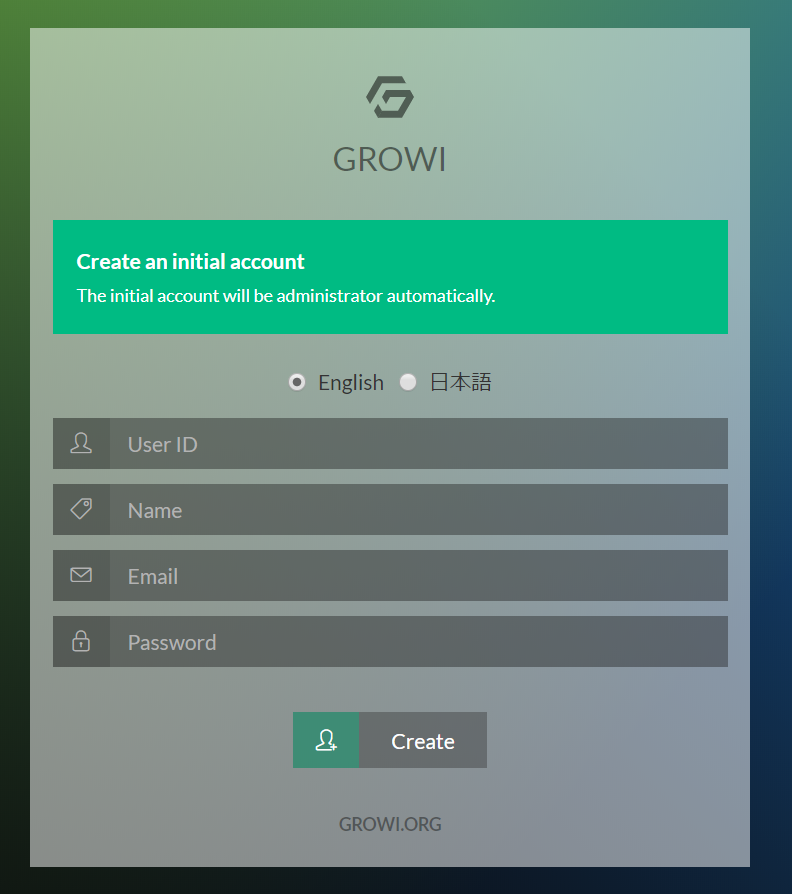
起動が確認できたのでsystemctlで起動できるようにする。
user@Jetson $ sudo nano /etc/systemd/system/growi.service
ファイルの中身。
[Unit]
Description=Growi
After=network.target mongod.service

[Service]
WorkingDirectory=/opt/growi                <-ここと
EnvironmentFile=/etc/sysconfig/growi    <-ここと
ExecStart=/usr/local/bin/npm start         <-ここを確認。

[Install]
WantedBy=multi-user.target
npmの場所は
user@Jetson $ npm bin -g
で調べられる。
次に、"/etc/sysconfig/growi"を作成。
user@Jetson $ sudo nano /etc/sysconfig/growi
中身はこんな感じ。ほぼインストールのデフォルト状態。
PORT=3000
MODE_ENV=production
PASSWORD_SEED="openssl rand -base64 128 | head-1`"
MONGO_URI="mongodb://localhost:27017/growi"
REDIS_URL="redis://localhost:6379/growi"
ELASTICSEARCH_URI="http://localhost:9200/growi"
FILE_UPLOAD=local
Growiをサービス起動。
user@Jetson $ systemctl restart growi.service
user@Jetson $ systemctl status growi.service
大丈夫そうなら自動起動を設定。
user@Jetson $ systemctl enable growi.service
自動起動の設定ができているかどうかは以下のコマンド。
user@Jetson $ systemctl is-enabled growi.service